10 Best Quiet Gaming Keyboards in 2026: Silent Switches & Thocky Builds
Late-night gaming shouldn’t mean dealing with a keyboard that sounds like a vintage typewriter. Standard mechanical boards easily push past 70 decibels (dB), turning every frantic firefight into a racket that leaks right into your Discord mic or wakes up the whole house.
Modern quiet gaming keyboards change the game by staying well under the 40 dB threshold. They pull this off by ditching loud clicky mechanisms for smooth linear switches, injecting thick internal sound-dampening foam to swallow case echoes, and using heavy factory lubrication on stabilizers to kill the annoying rattle of large keys like the spacebar. You get the fast execution and tactile feedback you need for high-stakes gaming, minus the noise.
Here are the top-performing quiet gaming keyboards on the market right now, broken down by their exact strengths:
- Best Overall Mechanical: Corsair Strafe RGB MK.2 (Built around genuine Cherry MX Silent Red switches for a classic layout that cuts keystroke noise by 30 percent).
- Best Custom Studio Pick: be quiet! Light Mount (A full-sized deck packed with three separate internal sound-absorbing foam layers and pre-lubed linear silent orange switches).
- Best Rapid Trigger Silent: SteelSeries Apex Pro TKL Gen 3 (Uses magnetic Hall Effect OmniPoint 3.0 switches, letting you tweak the actuation point to avoid bottoming out keys and making noise).
- Best High-End Custom: ASUS ROG Azoth Extreme (An enthusiast 75 percent layout using a carbon fiber plate, triple PORON/silicone dampening layers, and a switchable hard/soft gasket mount).
- Best Pure Budget: NZXT Function 2 Mini (A compact frame using pre-lubed linear optical switches and dual-layer internal foam for quick, quiet inputs without the high-end price tag).
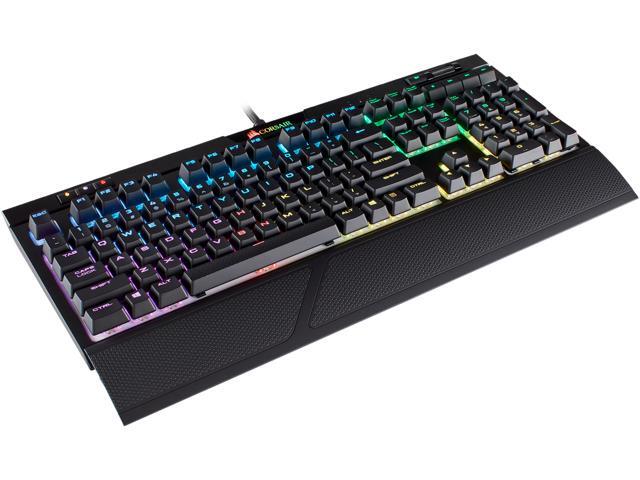
Corsair Strafe RGB MK.2 — The Gold Standard Full-Size Pick

Why It Stands Out
The Corsair Strafe RGB MK.2 is built from the ground up for high-performance PC setups that cannot tolerate loud mechanical clacking. It retains a full-sized layout with dedicated media buttons and a volume scroll wheel while offering a massive 30% reduction in typing noise compared to standard mechanical boards.
This makes it an absolute favorite for late-night streamers who want full layout utility but need to stop keystrokes from bleeding into a live microphone.
Key Features & Specs
- Switch Type: Genuine Cherry MX Silent Red linear switches.
- Acoustic Profile: Subdued, low-frequency “thud” with no high-pitched metallic pinging.
- Key Engineering: Specialized internal thermoplastic elastomer (TPE) dampeners built directly into each switch stem to cushion both the downward strike and the upward rebound.
- Chassis Build: Heavy-duty reinforced internal frame engineered to absorb structural vibrations and eliminate case echoes.
- Gaming Extras: Per-key RGB backlighting via Corsair iCUE software, 8MB of onboard profile storage, full N-key rollover, and a detachable soft-touch wrist rest.
The Quick Verdict
Corsair STRAFE RGB MK.2 Cherry MX Red Mechanical Gaming Keyboard with RGB LED Backlit – CH-9104110-NAHighly recommended for competitive players and streamers who need standard media keys and full macro support but require a stealthy, mic-safe noise profile.
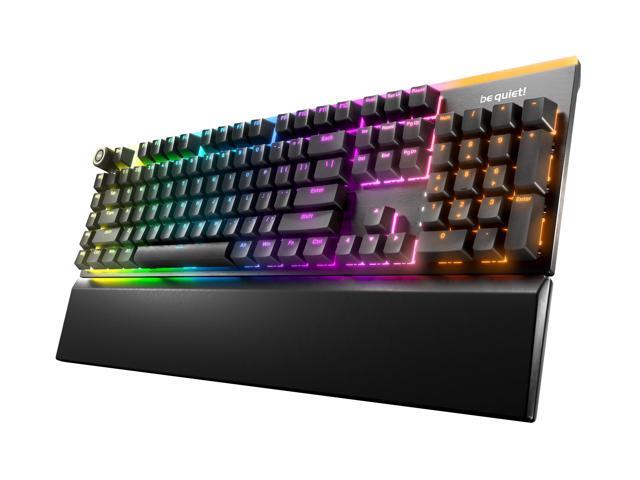
Be quiet! Light Mount — The Precision Acoustic Studio Choice
Why It Stands Out
Leveraging decades of specialized PC component acoustics, the be quiet! Light Mount approaches keyboard design like a silent PC chassis. It prioritizes internal vibration isolation and heavy factory lubrication to kill the annoying rattles and loose metallic sounds common in mainstream boards.
It delivers an incredibly smooth, studio-grade typing experience that leaves absolutely no empty space for sound to echo inside the body.
Key Features & Specs
- Switch Type: Factory-lubricated proprietary be quiet! Silent Linear Orange switches (45g actuation force).
- Acoustic Profile: Muted, highly consistent whisper-quiet linear stroke.
- Key Engineering: A complete triple-layer sound-dampening system featuring a foam layer between the top plate and the PCB, a second foam layer directly beneath the PCB, and a thick silicone isolation cushion lining the very bottom of the housing.
- Chassis Build: Sturdy brushed aluminum 3D top plate paired with a high-durability ABS bottom housing, keeping the board firmly planted without flexing.
- Gaming Extras: Hot-swappable 5-pin MX style switch sockets, high-grade double-shot PBT keycaps with translucent legends, an integrated aluminum 3D Media Wheel, and 5 dedicated programmable macro keys managed via the be quiet! IO Center software.
The Quick Verdict
be quiet! Light Mount Mechanical Keyboard Tactile Hot-Swappable Lubricated Silent Switches 3D Media Wheel ARGB Keyboard Quality PBT…The ultimate pick if you want an enthusiast, pre-lubed custom keyboard feel straight out of the box with maximum layers of physical sound proofing.
SteelSeries Apex Pro TKL Gen 3 Wireless — The Adjustable Speed King
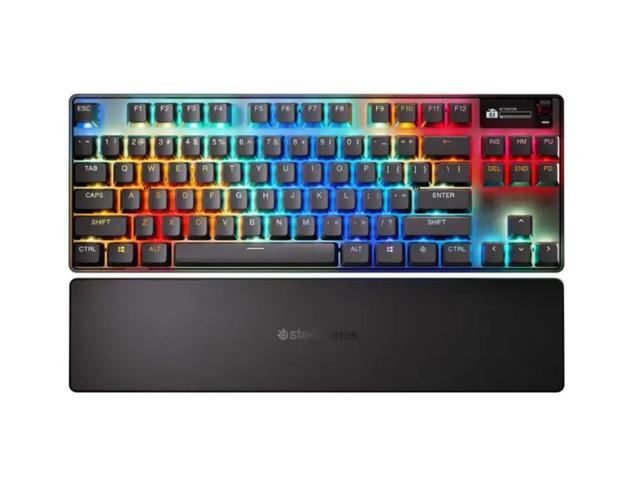
Why It Stands Out
Competitive FPS players usually avoid quiet keyboards because padded silent switches can sometimes feel soft or slow down raw response times. The SteelSeries Apex Pro TKL Gen 3 Wireless completely solves this problem. It is the best gaming keyboard quiet enough for shared rooms while maintaining absolute top-tier tournament speed.
Using magnetic switches instead of traditional mechanical leaf springs, it gives you hyper-fast rapid trigger features without forcing you to deal with loud, distracting clacking.
Key Features & Specs
- Switch Type: OmniPoint 3.0 Adjustable HyperMagnetic Switches (Analog Hall Effect Sensors).
- Acoustic Profile: Clean, dampened “thock” sound rather than a sharp, clattering snap.
- Key Engineering: Fully adjustable actuation depth ranging from a feather-light 0.1 mm down to a deep 4.0 mm. You can deliberately set your keys to register inputs long before they smash into the bottom frame, heavily reducing typing noise.
- Chassis Build: Aircraft-grade aluminum alloy top plate outfitted with an upgraded triple-layer sound-dampening internal foam assembly.
- Gaming Extras: Quantum 2.0 dual wireless lag-free connectivity (2.4GHz and Bluetooth 5.0), integrated OLED Smart Display for hardware monitoring, per-key lubrication, and premium stabilizer tooling that eliminates keycap wobble.
The Quick Verdict
SteelSeries Apex Pro TKL Wireless Gen 3 OmniPoint 3.0 HyperMagnetic Switches, Adjustable Actuation, Rapid Trigger, Game-Ready Presets, Protection…The absolute premier pick for Valorant, Apex Legends, or Counter-Strike players who need maximum rapid-trigger execution and zero input delay, but still want a highly disciplined, quiet keyboard for gaming.
ASUS ROG Azoth Extreme — The Ultra-Premium Custom Champion
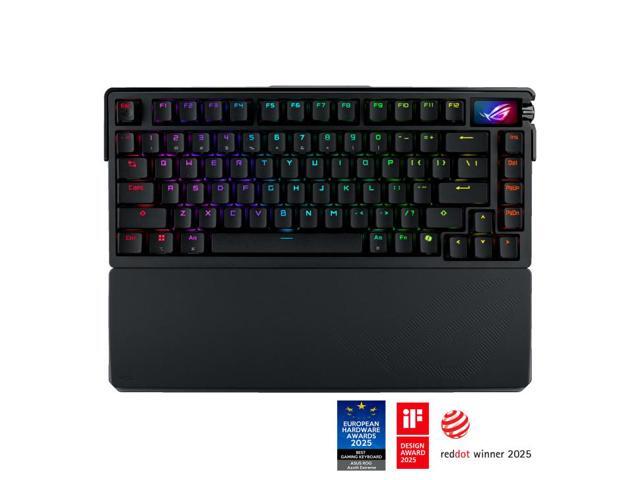
Why It Stands Out
If you want a board that feels and sounds like an expensive, heavy enthusiast custom right out of the box, the ASUS ROG Azoth Extreme is unmatched. It takes the premium gasket-mount construction found in the custom keyboard scene and merges it with a blisteringly fast 8,000Hz polling rate for competitive gaming.
It completely eliminates the hollow metallic resonance of standard gaming boards, providing a deeply isolated, satisfying acoustic signature that proves a high-performance deck can double as a stellar quiet mechanical gaming keyboard.
Key Features & Specs
- Switch Type: Hot-swappable, pre-lubricated ROG NX mechanical linear switches (with walled stems for wobble reduction).
- Acoustic Profile: Deep, thick, acoustically isolated “thock” with zero spring noise.
- Key Engineering: A premium acoustic sandwich consisting of two distinct layers of PORON sound-dampening foam, an internal PORON switch pad, and a heavy silicone base pad. This extensive dampening makes it an incredibly good quiet gaming keyboard out of the box. It also includes a physical toggle switch to adjust the gasket mount stiffness between “Hard” for fast-rebound gaming and “Soft” for cushioned, quiet typing.
- Chassis Build: Full CNC-machined aluminum alloy chassis paired with an advanced carbon fiber positioning plate that absorbs structural vibrations.
- Gaming Extras: Integrated 1.47-inch full-color OLED touchscreen for real-time system monitoring, 3-way control knob, tri-mode wireless connectivity (up to 1,600 hours of battery life), and an included extended silicone wrist rest with an aluminum base.
The Quick Verdict
A luxury, investment-grade choice for gamers who demand elite construction, flawless wireless speeds, and a completely vibration-dampened typing sound.
ASUS ROG Azoth Extreme Wireless Custom Mechanical Gaming Keyboard 75% TKL, ROG NX Snow Clicky Switches, PBT Keycaps, Aluminum Chassis, Carbon…Logitech G915 TKL — The Low-Profile Stealth

Why It Stands Out
If you want to completely clear out desk clutter without your keys sounding like a machine gun, the Logitech G915 TKL is the best quiet keyboard for gaming with a low-profile layout. Traditional mechanical frames stand nearly two inches tall and create a large, hollow space where noise can bounce around.
Logitech completely re-engineers this layout by flattening the housing down to a mere 22mm thick. This short-travel blueprint cuts down on structural acoustics while giving your wrists a much more natural, flat angle against your desk.
Key Features & Specs
- Switch Type: Low-profile GL Linear mechanical switches.
- Acoustic Profile: A very soft, shallow tap with zero metallic echo.
- Key Engineering: Features a highly compressed 1.5mm actuation depth and a short 2.7mm total travel distance. Because the keycaps travel half the distance of standard mechanical decks, they have significantly less room to build upward speed. This directly minimizes the heavy bottom-out impact sound that makes normal keyboards so loud.
- Chassis Build: Ultra-thin, aircraft-grade brushed aluminum alloy top panel attached to a steel-reinforced bottom housing to prevent flexing.
- Gaming Extras: Pro-grade 1ms LIGHTSPEED wireless connectivity, dedicated soft-rubber media controls, an integrated metal volume roller bar, and up to 40 hours of continuous non-stop gaming on a single charge with full RGB brightness active.
The Quick Verdict
An incredibly sleek, space-saving tenkeyless deck that works perfectly as a low-profile gaming quiet keyboard for players who prefer shallow, fast laptop-style inputs with absolute silence.
AULA F99 Pro (Silent Version) — The Budget Custom Darling
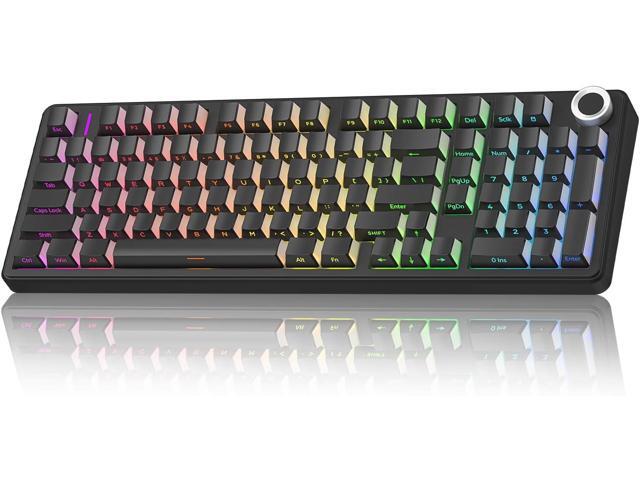
Why It Stands Out
Mainstream gaming brands usually charge a heavy premium for specialized soundproofing. The AULA F99 Pro completely flips the script, serving as the best budget quiet gaming keyboard for players who want a truly dead-silent acoustic footprint without breaking the bank.
It brings the high-end enthusiast custom keyboard experience down to an accessible price bracket, packing a dense 96% compact layout complete with a metal volume knob and structural dampening that rivals boards triple its price.
Key Features & Specs
- Switch Type: Pre-installed, ultra-quiet linear Silent Switches (Outemu/LEOBOG variants).
- Acoustic Profile: A deep, soft “pillowy” typing texture with absolutely zero high-frequency rattle or spring ping.
- Key Engineering: Built using a flexible leaf-spring gasket mount combined with a multi-layered sound insulation system. This layout crams five separate internal layers—sandwich foam, an IXPE switch pad, PET sound-improving film, bottom foam, and a custom-molded silicone case pad—into the housing. This extensive dampening strips out internal air gaps to deliver an incredibly quiet gaming mechanical keyboard performance.
- Chassis Build: Sturdy ABS plastic housing with a 1.2mm single-key flex-cut PCB and a flexible polycarbonate (PC) positioning plate that yields under pressure to absorb impact energy.
- Gaming Extras: Massive 8,000mAh rechargeable dual-battery setup for extreme wireless runtime, tri-mode connectivity (2.4GHz wireless, Bluetooth 5.0, and USB-C wired), south-facing RGB backlighting, and durable side-engraved PBT keycaps.
The Quick Verdict
An absolute steal for budget-conscious setup builders who refuse to tolerate noisy keys and want a fully hot-swappable, heavy-duty wireless layout right out of the box.
NZXT Function 2 Mini — The Fast Optical Choice
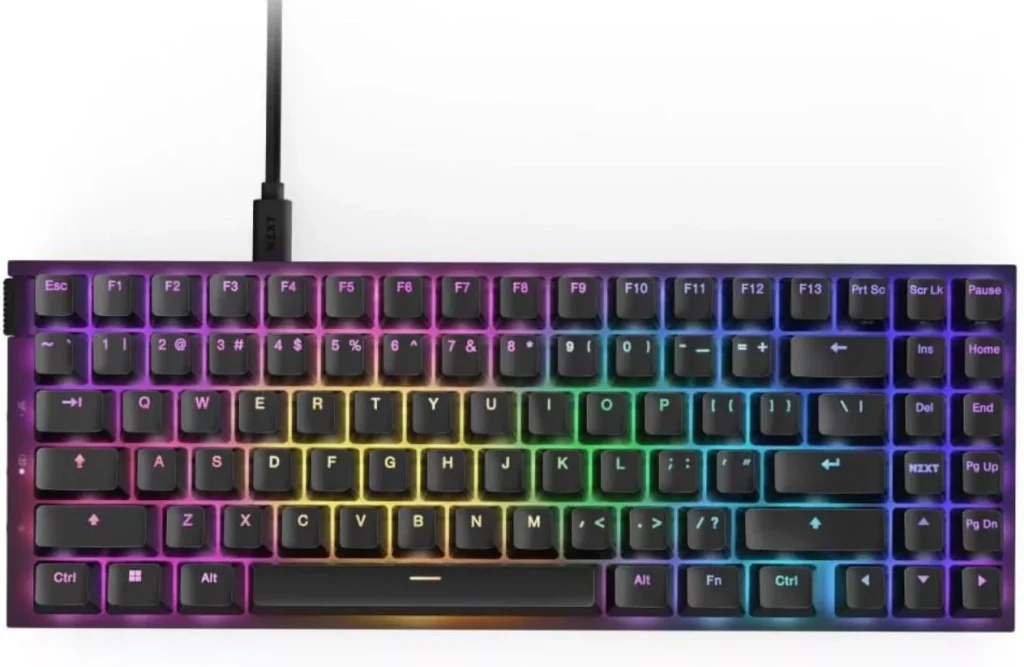
Why It Stands Out
If you want blistering, tournament-ready speed but don’t want your room sounding like a hail storm, the NZXT Function 2 Mini delivers. Most high-speed competitive decks rely on stiff mechanical switches that produce a high-pitched metallic rattle when frantically tapped.
NZXT bypasses this entirely by installing swift optical linear switches into a compact MiniTKL form factor. It gives you raw, premium performance and an incredibly quiet profile at a fraction of the price of enthusiast custom setups, earning its place as the best cheap quiet gaming keyboard.
Key Features & Specs
- Switch Type: NZXT Swift Linear Optical Switches (40g actuation force, 0.2ms response time).
- Acoustic Profile: A light, clean, and highly dampened linear tap with no spring ping.
- Key Engineering: Features an adjustable actuation point toggled between a hyper-fast 1.0mm and a standard 1.5mm via NZXT CAM software. Structurally, it features a tape-enhanced PCB combined with two distinct internal layers of sound-dampening foam designed to swallow case echo and vibrations. The switches and plate-mounted stabilizers come heavily pre-lubricated from the factory to eliminate the harsh, loose scratchiness found in most budget frames.
- Chassis Build: Top plate is built from a rigid, 3mm thick aerospace-grade 5000-series aluminum alloy frame, keeping the compact body firmly anchored.
- Gaming Extras: Insanely fast 8,000Hz polling rate (transmitting signals up to 8x quicker than standard keyboards), a left-side physical volume roller and mute button, hot-swappable switch sockets, and fade-resistant double-shot shine-through PBT keycaps.
The Quick Verdict
The ultimate target for space-conscious, competitive gamers looking for a highly responsive, ultra-fast gaming keyboard quiet enough for late-night grind sessions without draining their wallet.
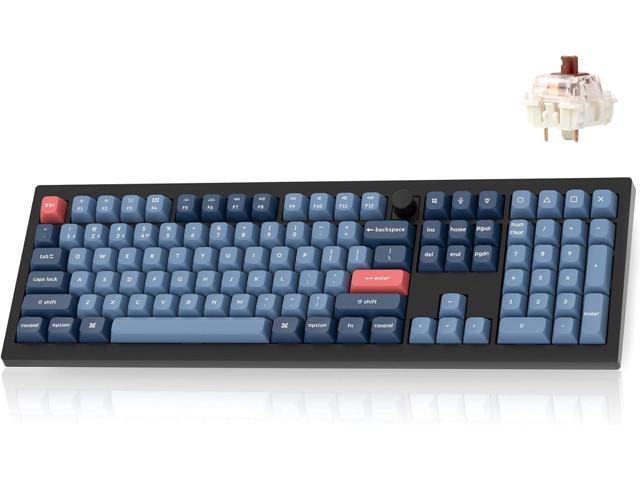
Keychron V6 Max (Red Switch) — The Hot-Swappable Entry Point
Why It Stands Out
If you split your time evenly between intensive daytime typing workloads and late-night open-world gaming, you need a full-sized deck that does not compromise on office etiquette or gaming response.
The Keychron V6 Max provides a fantastic full 100% layout entry point into the enthusiast custom scene. It brings heavy structural sound dampening to a full-sized blueprint, proving you do not have to settle for a tiny, stripped-down travel frame just to get a highly reliable, good quiet gaming keyboard.
Key Features & Specs
- Switch Type: Factory-pre-lubed Gateron Jupiter Red linear switches.
- Acoustic Profile: A deep, clean, highly uniform mechanical sound with zero pinging.
- Key Engineering: Assembles an internal gasket mount design with a highly flexible polycarbonate (PC) positioning plate instead of rigid steel. The internal structure is stuffed with acoustic dampening inserts, including specialized sound-absorbing foam, a case foam layer, and a dense bottom pad. This setup cushions each key press to prevent hollow echoing, resulting in a remarkably well-isolated quiet mechanical gaming keyboard workspace.
- Chassis Build: Robust, thick-walled ABS plastic housing featuring dual 2.4 GHz wireless receivers (Type-A and Type-C dongles) alongside traditional Bluetooth 5.1 and wired connections.
- Gaming Extras: Open-source QMK/VIA web-based layout remapping software, hot-swappable 3-pin/5-pin switch sockets for immediate tool-less switch swapping, south-facing RGB backlighting, and premium double-shot PBT keycaps molded in an ergonomic OSA profile.
The Quick Verdict
A highly versatile, easy-to-mod full-sized powerhouse built for hybrid gamers who require crisp linear keys, massive re-programmability, and deep physical noise reduction.
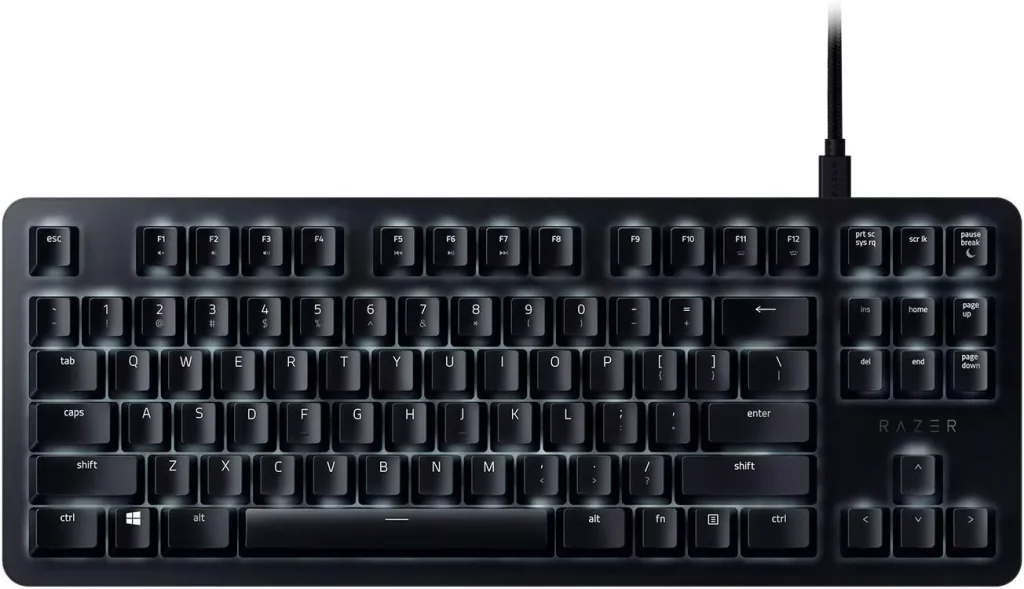
Razer BlackWidow Lite — The Minimalist Performer
Why It Stands Out
Many mechanical options look overly aggressive with jagged edges and loud, flashing rainbow patterns. The Razer BlackWidow Lite takes a different route, serving as a highly stealthy, professional tenkeyless (TKL) deck that fits perfectly on an office desk during the day and handles fast-paced tactical shooters at night.
It strips away unnecessary bulk to keep your desk clean while focusing squarely on internal key stabilization to deliver a remarkably quiet keyboard for gaming.
Key Features & Specs
- Switch Type: Proprietary Razer Orange tactile mechanical switches.
- Acoustic Profile: A light, soft, tactile bump sound with zero sharp metallic clicking.
- Key Engineering: Ships with pre-packaged thick rubber O-ring sound dampeners that can be quickly slipped onto the stem of every single keycap. While the Razer Orange switches are natively quiet, adding these O-rings physically pads the downstroke to minimize bottom-out impact. This lets you maintain high typing speeds while creating a highly efficient, custom-tailored best quiet gaming keyboard configuration.
- Chassis Build: Sleek, low-profile matte aluminum top frame with a compact, detached braided micro-USB cable assembly for high mobility.
- Gaming Extras: Crisp, clean white LED backlighting with individual key brightness adjustments, 10-key rollover anti-ghosting technology, a 1,000Hz polling rate for near-instant inputs, and full layout macro configuration via Razer Synapse.
The Quick Verdict
A highly disciplined, minimalist mechanical deck built explicitly for professionals and casual players who need tactile feedback without drawing any noise complaints from nearby coworkers or roommates.
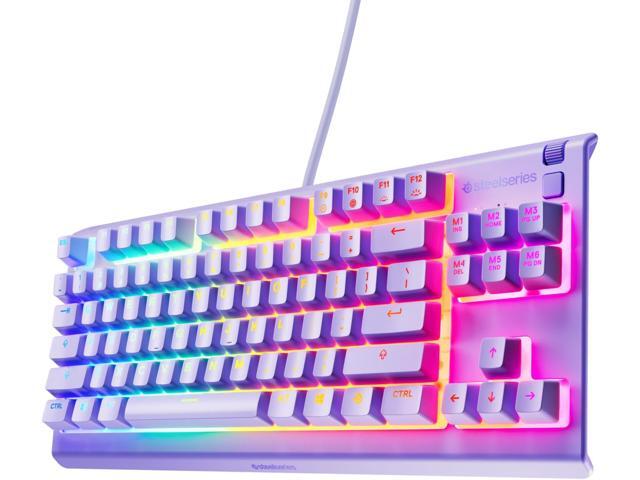
SteelSeries Apex 3 — The Ultimate Pure Budget Silent Pick
Why It Stands Out
If you want a setup that is completely silent and you are working with a strict budget, mechanical switches might not be the right move. Even dampened mechanical keys make a faint acoustic thud.
The SteelSeries Apex 3 steps in as the best budget quiet gaming keyboard by completely ditching traditional metal springs and plastic sliders for a premium, low-friction membrane design. This choice gives you a whisper-quiet canvas that is virtually soundless, making it an incredible value for anyone hunting for the best cheap quiet gaming keyboard.
Key Features & Specs
- Switch Type: Whisper-Quiet Low-Friction Membrane Switches.
- Acoustic Profile: Near-silent operation with a soft, padded touch and zero structural noise.
- Key Engineering: Uses highly durable, low-friction membrane sheets rated for over 20 million keystrokes. By eliminating physical mechanical leaf springs and sliding plastic stems entirely, there is no friction to create sharp high-frequency noises. It also features an IP32 water-resistant construction, sealing the internal electronics against accidental spills or drink accidents during intense gaming sessions.
- Chassis Build: High-quality, durable polymer frame built with integrated three-way cable routing channels on the bottom panel to keep your desk clutter-free.
- Gaming Extras: Brilliant 10-zone customizable RGB illumination, a clickable metal roller bar and dedicated media button for instant audio adjustments, and a premium full-sized magnetic soft-touch wrist rest that clips right into place.
The Quick Verdict
A highly affordable, spill-proof, full-sized keyboard tailored specifically for cost-conscious players who want absolute silence and zero mechanical key noise.
Completing the Stealth Setup: Quiet Gaming Keyboard and Mouse Bundles
Why a Silent Mouse is Non-Negotiable
Investing in a premium silent keyboard only solves half of your desktop noise problem. Many gamers spend hours hunting down dampened switches and case foam, only to pair their quiet keyboard with a traditional gaming mouse that produces a sharp, piercing snap every time they left-click.
Standard gaming mice use mechanical micro-switches designed for a crisp tactile snap, but that sound frequency cuts straight through quiet rooms and leaks instantly into active microphones.
To maintain total acoustic stealth, you need a unified quiet gaming keyboard and mouse ecosystem. Matching a dampened deck with a dedicated silent-switch mouse ensures your entire workspace stays completely below the radar during intense late-night sessions.
Top Silent Mouse Upgrades for Your Setup
While pure out-of-the-box combo packages are rare in the high-performance gaming space, building your own high-tier quiet gaming mouse and keyboard bundle is incredibly straightforward. Here are the best companion mice to pair with your quiet keyboard:
- Razer Pro Click Mini: Do not let the clean look fool you; this compact mouse is packed with silent tactile micro-switches rated for 15 million clicks. It delivers a highly responsive gaming experience while producing a virtually soundless, cushioned click that mirrors the stealth performance of a low-profile keyboard.
- Logitech M650 L Full Size: Perfect for players with larger hands who need a comfortable grip for long strategy or open-world gaming sessions. Logitech utilizes its proprietary SilentTouch technology, which eliminates over 90% of traditional click noise while keeping a reassuring, tactile feedback loop under your index finger.
- ASUS ROG Strix Impact III Wireless: If you want to customize your setup further, this frame features push-fit switch sockets. This allows you to easily swap out standard gaming switches for specialized, silent mechanical micro-switches without touching a soldering iron, instantly completing your stealth peripheral array.
Frequently Asked Questions
What makes a mechanical keyboard truly quiet?
A keyboard stays quiet by using silent linear switches with built-in rubber bumpers on the stems, heavy factory lubrication to stop stabilizer rattle, and internal layers of dense foam or silicone to swallow hollow case echoes.
Do quiet switches reduce gaming performance?
No. The dampeners only cushion the physical bottom-out impact of the keycap. The internal electronics, actuation points, and fast 1,000Hz to 8,000Hz polling rates remain identical to standard loud switches.
Can you make a regular gaming keyboard quieter?
Yes. You can slide rubber O-rings onto your keycap stems to absorb downward impacts, open the case to install dense packing foam, or brush grease onto the stabilizers to stop spacebar rattle.
Is a membrane keyboard quieter than a silent mechanical keyboard?
Not necessarily. While basic membrane rubber domes are naturally quiet, a premium gasket-mounted silent mechanical keyboard with lubed switches delivers a lower, more muted decibel profile without the mushy typing feel.
Also, check some of our articles: