
15 Best Laptop Games for Travel: Low-Spec, Offline & Trackpad Friendly
We’ve all faced the infamous “Coffee Shop Dilemma.” You have a latte and an hour to kill, so you decide to play something. However, launching a modern title sends your fans screaming like a jet engine while your battery free-falls. It draws awkward stares from everyone nearby and completely defeats the purpose of relaxing.
This is where we need to be picky. A truly great laptop game isn’t just about lower settings; it is about respecting your hardware’s limits. We define this category by three strict rules: it must run on low-voltage specs without turning your chassis into a frying pan, it needs to work completely offline, and it has to be genuinely playable with nothing but a trackpad.
The Winner’s Circle: Quick Summary
If you just want the best of the best without scrolling, here are the three titles that master the laptop lifestyle.
| Category | Game | The Verdict |
|---|---|---|
| 🏆 Best Overall | Balatro | The poker roguelike that is impossible to put down. It runs flawlessly on integrated graphics and requires zero mouse reflex—just pure strategy. |
| 🔋 Best for Battery | Into the Breach | A tactical sci-fi masterpiece. It sips power so efficiently you can often get 6+ hours of playtime, and the turn-based grid is perfect for trackpads. |
| 📖 Best for Story | Citizen Sleeper | A tabletop-inspired RPG set on a ruined space station. It offers a deep, emotional narrative that plays out entirely through simple clicks and reading. |
The 15 Best Laptop Games
1. Hades II

You wouldn’t expect a game this gorgeous to be laptop-friendly, but Supergiant Games are wizards of optimization. Hades II offers high-fidelity action that runs surprisingly well on older hardware, making it one of the best games for integrated graphics we have tested this year.
While it is fast-paced, the game handles offline play perfectly—no “always-online” DRM nonsense here. A quick tip for the coffee shop gamer: if you don’t have a mouse, rebind the controls to “Keyboard Only.” Playing with just WASD and the arrow keys is far more precise than struggling with a trackpad during a boss fight.
2. Balatro
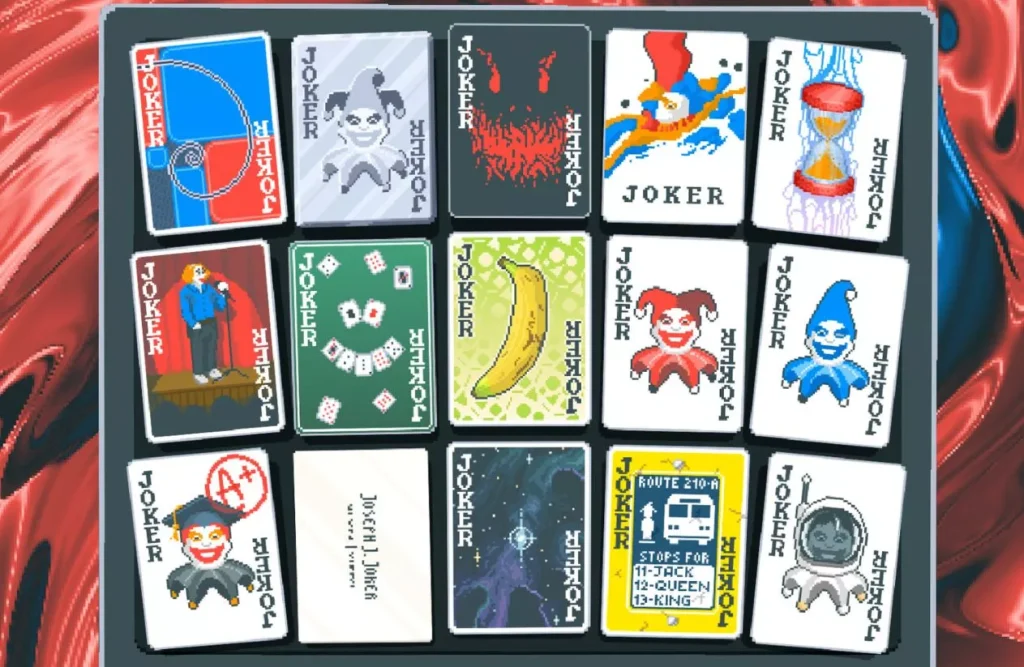
If you think you know poker, Balatro will happily prove you wrong while stealing three hours of your life. It’s a roguelike deck-builder where you cheat the system with illegal jokers and tarot cards.
Because it’s entirely 2D and turn-based, it is incredibly power-efficient—your fans won’t even spin up.
It also happens to be one of the best games to play with a trackpad currently on the market. There is no need for rapid movements or precision clicking; you can leisurely drag cards or click to play hands, making it ideal for cramped flights or lazy couch sessions where a mouse just isn’t an option.
3. Slay the Spire
You can’t talk about laptop gaming without bowing to the king. Slay the Spire practically invented the modern deck-building roguelike genre, and it remains unbeaten for pure efficiency.
It is so lightweight that it runs on practically anything with a screen, easily ranking as one of the top games with low power consumption for travelers.
You can often squeeze 5+ hours of playtime out of a standard ultrabook because it barely touches your CPU. Plus, the interface is completely stress-free for trackpad users; you can take your time dragging attacks to enemies without needing twitch reflexes. It is the perfect companion for a long commute where a power outlet is nowhere to be found.
4. Disco Elysium: The Final Cut
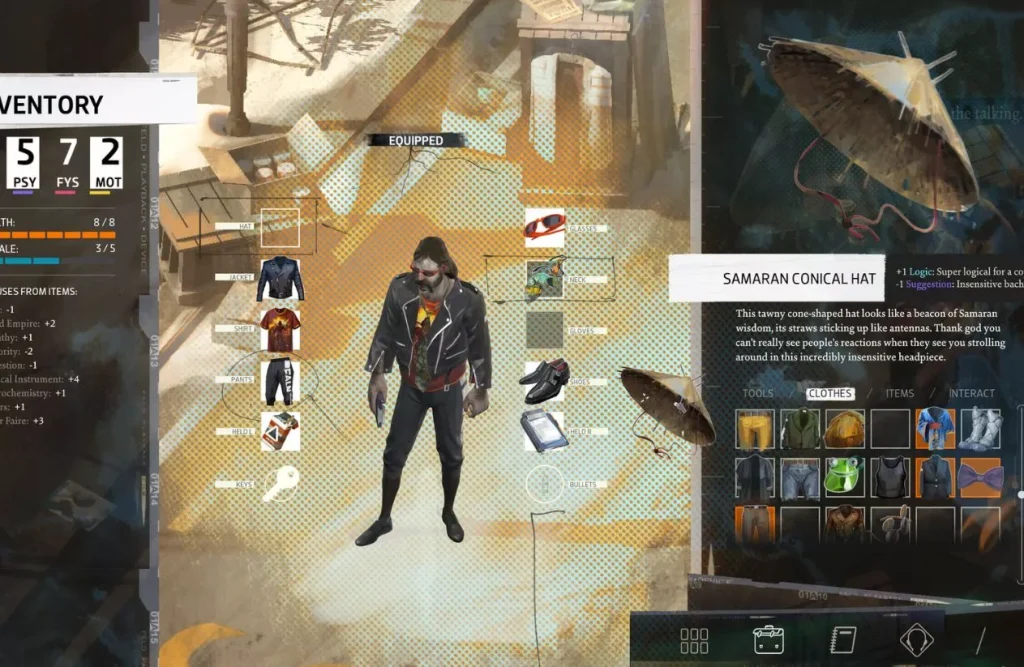
If you want a narrative that will stick with you for years, this is it. Disco Elysium plays more like an interactive novel than a traditional RPG, putting you in the shoes of an amnesiac detective with a chaotic inner monologue.
Because there is absolutely no combat—everything is resolved through dialogue choices and dice rolls—it is arguably the perfect laptop game for trackpad users.
You can play the entire 30-hour campaign with a single finger, leisurely clicking through conversations and exploring the painted world of Revachol. It prioritizes art direction over raw polygon count, meaning it runs beautifully on integrated graphics without turning your machine into a space heater.
5. Vampire Survivors
This is the perfect 30-minute dopamine hit for quick breaks. Vampire Survivors asks very little of you or your computer. The gameplay is deceptively simple: your character attacks automatically, so your only job is to steer them away from thousands of enemies.
Because there is zero clicking required during gameplay, it is one of the best casual laptop games for anyone stuck with a subpar trackpad. It costs less than a coffee and runs on virtually any machine made in the last decade.
Just be warned: when the screen fills with thousands of gems and explosions near the 30-minute mark, even sturdy laptops might get a little warm, so maybe don’t play this one directly on your lap in the summer.
6. Persona 5 Royal
If you want maximum bang for your buck, Persona 5 Royal is the undisputed champion. This isn’t just a game; it’s a semester-long commitment that offers over 100 hours of content.
Despite its flashy, stylish visuals, it is remarkably well-optimized, standing out as one of the deepest RPGs for low-end laptops you can play today.
The game’s “anime” aesthetic relies on art direction rather than raw graphical horsepower, meaning it scales down beautifully on older integrated graphics cards. Plus, the combat is strictly turn-based. You can navigate Tokyo, answer school quizzes, and battle shadows entirely with a trackpad while sipping your coffee, with zero stress about twitch reflexes.
7. Stardew Valley

You can’t have a list of laptop games without the grandfather of the modern cozy genre. Stardew Valley is the digital equivalent of a warm blanket. It is incredibly optimized, running smoothly on machines that struggle to open a web browser, cementing its place as one of the best cozy games for low-end laptops ever made.
The pixel art style is timeless and demands almost nothing from your GPU. Control-wise, it’s a dream on a trackpad; clicking to water crops or pet your chickens feels natural and requires zero haste. It’s the ultimate way to kill a few hours on a flight without worrying about your battery dying mid-harvest.
Also check our article: Games Like Stardew Valley: Top Alternatives To Play
8. Into the Breach
If you love chess but wish your pawns were giant mechs punching kaiju, this is your jam. Into the Breach is a masterclass in compact design. The entire battlefield fits on a single screen without any scrolling, which makes it feel like it was custom-built for 13-inch displays.
It is hands-down one of the best turn-based strategy games for laptops because it respects your time and your battery. A match takes five minutes. You can play it on a touchpad with zero friction since nothing moves until you click “End Turn.” It is tactical brilliance stripped of all the bloat that usually kills your battery life.
9. Animal Well

This game is a technical miracle. Weighing in at roughly 40MB—yes, megabytes—Animal Well offers a deeper world than many AAA games that eat up 100GB. It is a dense, non-linear puzzle box that feels like a fever dream, and because it runs on a custom engine built from scratch, it is incredibly efficient, making it one of the best atmospheric games for low-end laptops you can find.
While it looks like a retro platformer, the lighting and physics are surprisingly advanced, yet they tax your system very little.
There is almost no combat, so you don’t need twitchy mouse reflexes; you can navigate the eerie, neon-lit caverns perfectly fine with a trackpad, uncovering secrets at your own pace without draining your battery.
10. Dead Cells
I’m going to break my own rule slightly here: you really do not want to play this with a trackpad. However, if you have a controller stashed in your bag, Dead Cells is arguably one of the best action roguelites for low-end laptops ever made.
It combines the permanent progression of a roguelike with the sprawling exploration of a Metroidvania.
The combat is fluid, fast, and incredibly satisfying. Despite the chaotic on-screen action, the 2D pixel art engine is highly optimized, ensuring you get a silky smooth 60fps even on integrated graphics cards that struggle with 3D titles.
11. Sea of Stars
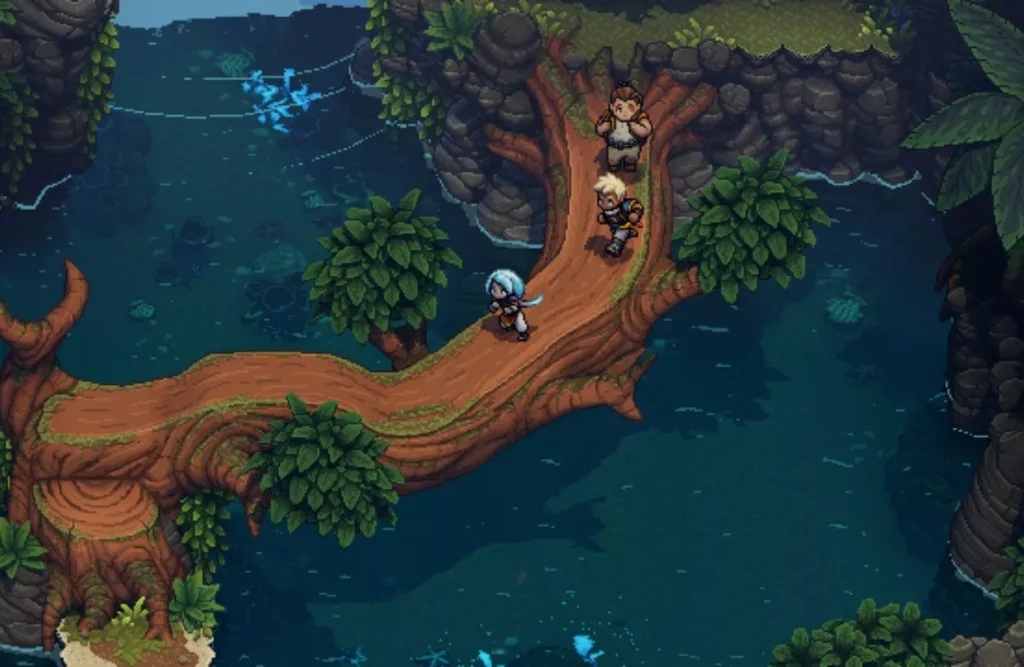
If you grew up playing Chrono Trigger, Sea of Stars will feel like coming home. It is a stunning turn-based RPG that uses dynamic lighting to make its pixel art pop, yet it remains incredibly easy on your hardware. It is easily one of the best lightweight RPGs for travel because it respects your battery life while delivering a grand adventure.
Since the combat is strictly turn-based (with some timed button presses that are easy to hit on a keyboard), you don’t need a mouse. You can explore its gorgeous islands and fight bosses using just the arrow keys and spacebar, making it a perfect companion for a long flight.
12. Tactical Breach Wizards
If you ever looked at XCOM and thought, “This needs more jokes and wizard cops kicking doors down,” this is your game. It is a hilarious tactical puzzler where you guide a squad of renegade mages through missions that feel like logic puzzles with guns.
It is perfect for quick breaks because the levels are bite-sized—usually wrapping up in 10 to 15 minutes. Since it is entirely turn-based, you can play comfortably with a trackpad, and the rewind mechanic lets you experiment with wild strategies without constantly reloading saves. It’s light, funny, and respects your time.
13. Hollow Knight
This game proves that you don’t need ray tracing to create a stunning world. Hollow Knight is a hand-drawn Metroidvania that looks like a gloomy cartoon come to life. Because it relies entirely on 2D assets and a highly efficient engine, it is easily one of the most beautiful games for integrated graphics ever released.
Don’t let the cute bugs fool you; the gameplay is deep, challenging, and offers easily 40+ hours of exploration. The controls are incredibly tight and map perfectly to a keyboard (Arrow keys + Z/X/C), so you can perform complex aerial maneuvers without ever touching the trackpad.
14. Factorio
Be warned: they don’t nickname this “Cracktorio” for nothing. If you have a spare 500 hours and don’t plan on sleeping, Factorio is waiting. You crash-land on an alien planet and build a factory to escape, starting with a single pickaxe and ending with a sprawling, automated industrial empire.
The optimization here is practically black magic; it runs on almost any potato with a processor, making it the undisputed king of best automation games for low end laptops.
While a mouse is helpful for combat, 99% of the game involves placing belts and assemblers, which works surprisingly well on a trackpad once you master the “Q” key for the pipette tool.
Also check our article: Best Games Like Factorio: The Ultimate List for Automation Addicts
15. UFO 50
Imagine finding a lost console from the 80s in an attic, except every single cartridge works and is actually good. UFO 50 isn’t a mini-game collection; it is a library of 50 fully fleshed-out titles ranging from RPGs and dungeon crawlers to frantic arcade shooters, all created by the minds behind Spelunky.
Because it adheres to strict 8-bit limitations, it is easily one of the best retro game collections for low-end laptops ever made. The file size is tiny, the system requirements are practically non-existent, and the sheer variety means you can carry an entire childhood’s worth of gaming on a single travel laptop.
How to Choose Games for Your Laptop (Buying Guide)
Integrated vs. Dedicated GPU: What You Can Realistically Run
If you bought a thin-and-light laptop for work or school, you likely have what is called “integrated graphics” (Intel Iris Xe, AMD Radeon, or Apple M-series chips). The good news? For the niche we are discussing, this is actually a benefit, not a drawback.
Dedicated graphics cards (like the NVIDIA RTX series) are powerful, but they are battery vampires that generate massive heat. For a peaceful coffee shop session, an integrated chip is superior because it runs cooler and quieter.
- The Golden Rule: If the game uses 2D sprites or pixel art, your integrated chip will crush it. If it is 3D, check if it was released before 2015 or relies on stylized art (like Hollow Knight) rather than photorealism.
The “Offline” Factor: Why It Matters for Travel
Nothing kills a flight faster than realizing your single-player game requires an internet connection just to launch. Many modern launchers (like the EA App or Ubisoft Connect) need to “phone home” to verify you own the game. If you are at 30,000 feet with no Wi-Fi, you are locked out.
- The Fix: Always launch your game once while you still have Wi-Fi at home to handle any updates or “first-time setup” checks. Better yet, prioritize games from stores like GOG.com, which are DRM-free and guarantee the game will work even if you are in a submarine.
Input Matters: Mouse vs. Trackpad vs. Controller
Your input method usually dictates what you can play more than your processor does.
- Trackpad: The ultimate convenience, but terrible for speed. Stick to turn-based games (Civilization, Slay the Spire) or point-and-click adventures. Trying to play a shooter with a trackpad is a recipe for frustration.
- Mouse: Essential for FPS or RTS games, but practically impossible to use on a plane tray table or a tiny cafe table. Only plan for mouse-heavy games if you have a guaranteed flat surface.
- Controller: The secret weapon. A small gamepad (like an 8BitDo) fits in any bag and lets you play action-heavy titles (Hades, Dead Cells) comfortably in your lap, completely bypassing the awkward ergonomics of a laptop keyboard.
Conclusion
So there you have it. The days of staring blankly at a spreadsheet while waiting for your flight are over. You don’t need a beastly rig or a massive power brick to enjoy a truly great laptop game. Whether you crave deep strategy or cozy vibes, these picks prove that “low specs” doesn’t mean “low quality.”
Just remember the golden rule of travel gaming: preparation is everything. Don’t wait until you are buckled into seat 14B to realize you forgot to hit install. Go through this list, grab your favorites, and verify they launch offline while you still have decent Wi-Fi. Your future self, stuck on a six-hour delay with nothing but a trackpad and a lukewarm coffee, will thank you for it.
Frequently Asked Questions (FAQ)
Can I play modern games on a laptop with integrated graphics?
Yes, especially if the game relies on 2D sprites or stylized art rather than photorealism. Integrated chips like Intel Iris Xe or Apple M-series are excellent for running low-spec games cooler and quieter than dedicated GPUs.
Why is it important to check if a game works offline before traveling?
Many modern game launchers require an active internet connection to verify ownership. If you don’t launch the game once while connected to Wi-Fi to handle these checks, you may be locked out when you are offline on a plane.
Which input method is best for laptop gaming: Mouse, Trackpad, or Controller?
It depends on the game. Trackpads are perfect for turn-based strategy or point-and-click games. Controllers are best for action games or roguelites where ergonomics matter. Mice are generally difficult to use in cramped travel spaces like airplanes.